Back home
Chrome extension

Audit any page from your toolbar.

See how ChatGPT, Perplexity, Claude and Google AI Overviews read the page you're on — without copying a URL anywhere.
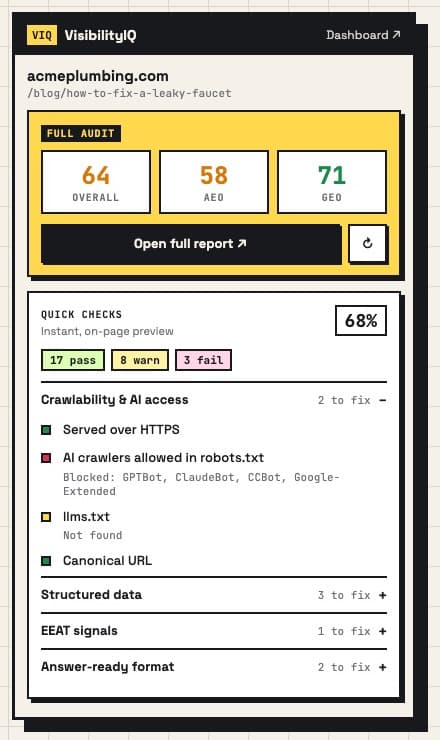
VisibilityIQ extension popup showing AEO and GEO scores and quick checks

Instant quick checks

28 on-page signals the moment you open the popup: AI-crawler access, llms.txt, schema, EEAT, headings, answer-ready format.

Full AEO + GEO audit

One click runs the complete VisibilityIQ audit on the tab you're on and shows your scores right in the popup.

Right-click any link

Audit a competitor or a page you haven't opened yet straight from the context menu.

Install in 2 minutes

Installing from the zip.

  1. 1

    Download and unzip

    Download the zip above and double-click it. You'll get a folder called visibilityiq-extension. Keep it somewhere permanent (e.g. Documents) — Chrome loads the extension from this folder.

  2. 2

    Open Chrome's extensions page

    Paste chrome://extensions into the address bar and press Enter. (Edge: edge://extensions.)

  3. 3

    Turn on Developer mode

    Flip the Developer mode switch in the top-right corner of the page.

  4. 4

    Click “Load unpacked”

    Select the visibilityiq-extension folder you unzipped in step 1 — the folder itself, not the zip.

  5. 5

    Pin it to your toolbar

    Click the puzzle-piece icon next to the address bar and pin VisibilityIQ. Open any page and click the VIQ icon to audit it.

Questions

Good to know.

Do I need Developer mode?+
No. Install it in one click from the Chrome Web Store. Developer mode is only needed for the manual zip install. If you loaded the zip earlier, remove that copy in chrome://extensions and install from the store to get automatic updates.
Is it safe?+
The extension only reads the page you're on when you click it, and only talks to visibilityiq.io. Quick checks run entirely in your browser. It doesn't track your browsing.
Chrome shows a “Disable developer mode extensions” warning.+
That's Chrome's standard notice for any extension installed outside the Web Store, so it only appears for the zip install. Click the × to dismiss it, or switch to the Chrome Web Store version.
How do I update it?+
The Chrome Web Store version updates automatically. For the zip install, download the latest zip, replace the old folder's contents, then click the ↻ reload icon on the VisibilityIQ card in chrome://extensions.
Does it work in other browsers?+
Yes, in Chromium-based desktop browsers: Chrome, Edge, Brave, Arc and Opera. Not Safari, Firefox or mobile.